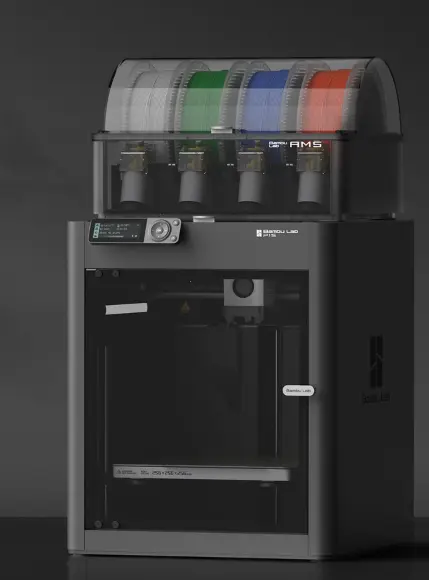
Bambu’s P1S pricing has stopped pretending to be a sale. The $699 MSRP is still printed on the product page with a line through it, but the actual price has been $399 through Black Friday, New Year’s, June, and again right now. That’s the price. The strikethrough is decoration.
I’ve got about 1,200 hours on my own P1S at this point and it’s still printing like it did in week one. That’s worth stating up front, because it colors everything below: I’m not comparing spec sheets from the outside, and I’m also not neutral. The machine earned its keep.
What’s more interesting is what happened to the combo pricing, because that’s where the real decision lives — and where most buying guides are still quoting stale numbers.
The actual prices, as of today
Straight off Bambu’s US store:
| Configuration | Price | Was |
|---|---|---|
| P1S | $399 | $699 |
| P1S AMS Combo (first-gen AMS) | $549 | $949 |
| P1S AMS 2 Pro Combo | $579 | $1,124 |
| P2S | $549 | — |
| P2S AMS 2 Pro Combo | $749 | $799 |
Free shipping on all of them, plus 30-day price protection and 14-day returns.
Two things jump out of that table.
First: never buy the first-gen AMS combo. It’s $549. The AMS 2 Pro combo is $579. Thirty dollars separates them, and the 2 Pro adds active filament drying, sealed storage, servo-driven feeding that’s meaningfully faster on color changes, and RFID spool sync. Thirty dollars. If you take one thing from this article, take that one — the $549 listing exists to make the $579 listing look good, and it works, because the $579 listing genuinely is good.
Second: never buy the AMS separately. A standalone AMS 2 Pro runs around $299 on Bambu’s store. P1S solo at $399 plus an AMS 2 Pro at $299 is $698. The combo is $579. You’re paying $180 for the AMS inside the bundle instead of $299. If there’s any chance you’ll want multicolor eventually, buy the combo now.
So the real question is $579 versus $749
That’s a $170 spread — wider than the $150 solo-price gap, because the P1S combo discount is deeper than the P2S combo discount. Everything below is about whether $170 is worth it.
Here’s what the P2S actually adds over the P1S:
The extruder is the real upgrade. The P2S uses a PMSM servo extruder delivering roughly 8.5 kg of extrusion force — about 70% more than the P1S’s stepper design — and it samples position and resistance at 20 kHz. That’s fast enough to detect filament grinding or a partial clog while it’s happening rather than after you’ve come back to a bird’s nest. If you’ve ever lost an eight-hour print to a clog you didn’t catch, this is the feature you’re paying for.
Auto Flow Dynamics Calibration. The P1S expects you to tune flow ratio manually for filament it doesn’t have a profile for. The P2S calibrates per-print. If you run a lot of off-brand filament — and if you’ve read anything else on this site, you know I do — this saves real fiddling.
Active Airflow System. The P1S enclosure traps heat passively and lands around 40°C. The P2S actively manages chamber air and gets to roughly 50°C, with better exhaust for ABS and ASA. Also better for PLA in the other direction, because it can vent instead of cooking.
5-inch touchscreen and a 1080p camera versus a 2.8-inch monochrome LCD and a camera that’s really only good for timelapses.
Hardened steel extruder and nozzle as standard, plus quick-swap nozzles and AI failure detection.
600 mm/s versus 500 mm/s. Ignore this one. You’ll print at 300–400 mm/s on either machine for anything you care about. It’s headroom, not throughput.
What’s identical: 256 × 256 × 256 mm build volume, 300°C hotend, CoreXY, enclosed chamber, auto bed leveling, vibration compensation, and the same material list up to CF composites. Neither one does PC or high-temp nylon reliably. Neither has LiDAR or dual nozzles.
My call
At $170, this is genuinely close, and closer than it was a week ago — the P2S combo was $699 until recently, and at that price I would have said buy it without much hesitation.
The case for spending it is the extruder. Grinding detection and auto flow calibration are the two features that actually reduce failed prints, and failed prints are the real cost of this hobby, not the printer. If you leave prints running unattended, $170 to catch a clog before it becomes a bird’s nest is cheap.
The case against is that $170 is most of a spare AMS, or six or seven rolls of decent filament.
But I want to be straight about the counterargument, because it’s strong, and my own machine is the evidence for it. Twelve hundred hours in, my P1S has needed nozzles and build plate maintenance and nothing else. No motion system drift, no board failures, no mystery quality regression. That’s a three-year-old design with an enormous print-farm install base behind it, and it shows. At $579 with a current-generation AMS 2 Pro, nothing else in the market is close on price-per-capability.
I’ll be honest about what my hours do and don’t prove, though. They’re strong evidence the P1S won’t fall apart on you. They’re not evidence the P2S extruder isn’t better at catching clogs, because I’ve never run one — the failures I’ve had were filament problems I caught manually, and a machine that catches them for me would have saved me time I didn’t count.
So:
Get the P2S combo at $749 if you print a variety of filaments, you buy third-party spools, you’re going to leave prints running unattended, or this is your first printer and you’d rather the machine handle calibration than learn to do it yourself.
Get the P1S AMS 2 Pro combo at $579 if you’re price-sensitive, you’re comfortable dialing in a flow ratio once per filament, or you’re adding a second machine to a setup where you already know your profiles. Manual flow calibration is ten minutes of work, not a skill barrier.
Get the P1S solo at $399 if you genuinely only print single-color functional parts. That’s most of what comes off my machines, and $399 is the cheapest credible path to an enclosed CoreXY. Just be honest with yourself about whether “I’ll never need multicolor” survives contact with your first year of printing — because upgrading later costs $299 instead of $180.
Get neither if you don’t need an enclosure. The A1 at $299 or the A1 Mini at $219 handles PLA and PETG for a lot less, and an enclosure you don’t need is a cooling problem, not a feature.
Two things to watch before you order
Third-party pricing can beat Bambu direct. GigaParts ran the P2S combo at $599 with a coupon code earlier this month, which would flip the entire recommendation — at $599 versus $579 there’s no argument, you take the P2S. Check the usual deal aggregators before buying at list.
Confirm which AMS is in the box if you’re buying anywhere other than Bambu’s own store. Plenty of retailer listings say “AMS Combo” without specifying generation, and a first-gen AMS combo priced like a 2 Pro combo is a bad deal that’s easy to walk into. On Bambu’s store the SKUs are labeled clearly. Elsewhere, read the included-items list.
Also worth noting: Bambu offers 30-day price protection. In a category where the number moves this often, that’s not a throwaway perk — if it drops after you order, claim it.
Prices verified against Bambu Lab’s US store on July 20, 2026. This is a category where pricing changes monthly, so check the live cart before ordering.