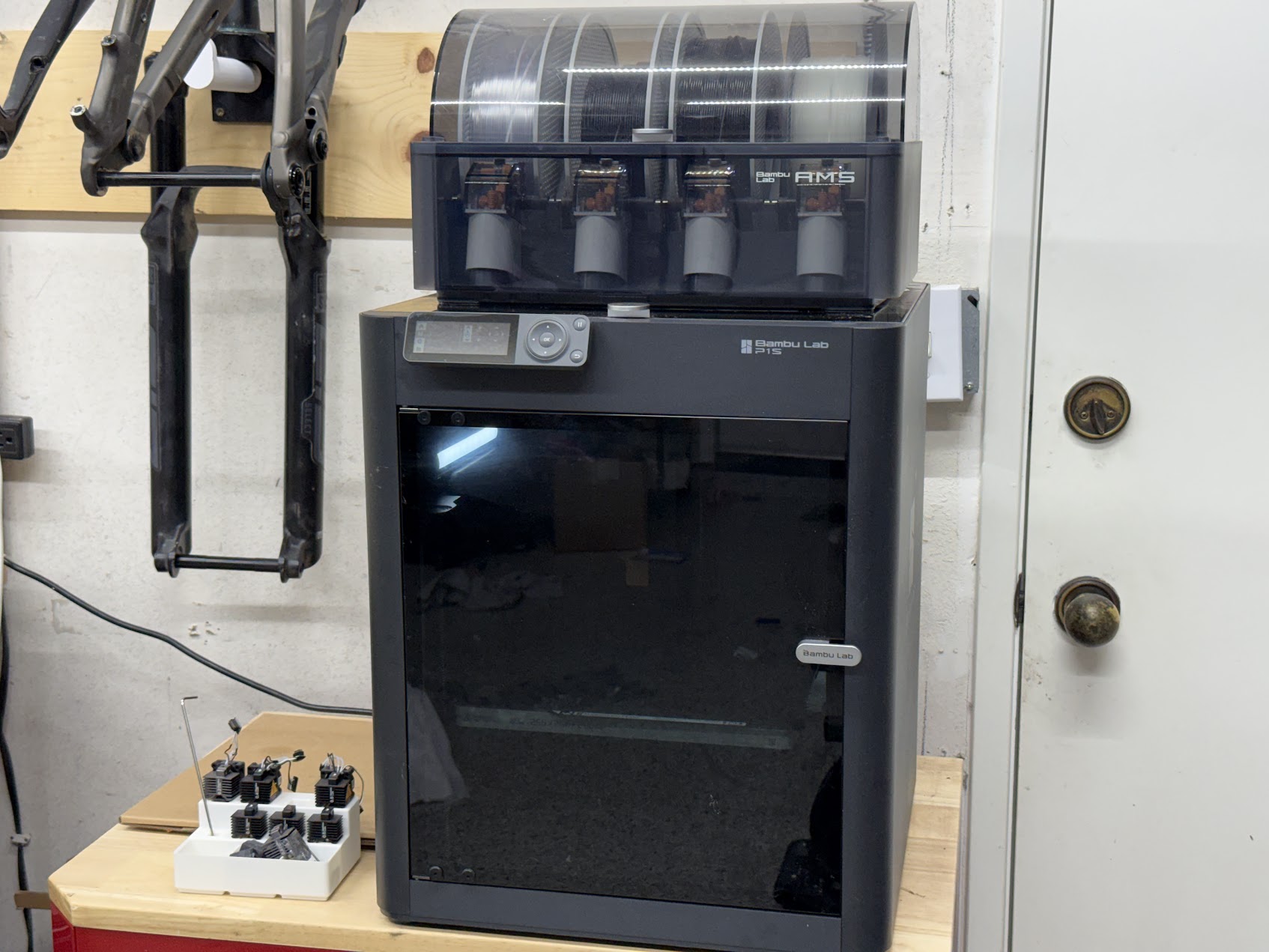
Short version: my Bambu Lab P1S has well over 1,000 hours of print time on it, and it hasn’t had a single significant issue. It’s been a great deal from day one, and at around $399 now (it’s dipped as low as $349 on sale this fall, down from a $699 launch price), it’s an even better one. The P2S is the newer printer, but for most people the P1S is still the one I’d buy.
This isn’t an unboxing review. It’s what a printer looks like after a year-plus of real use, mostly printing parts that have to work.
What I Actually Print on It
Almost everything I print is functional. That matters for a review, because a printer that makes great-looking Benchies can still be a pain for real parts.
- Bike parts, like the custom ASA headset spacer on my Factor road build
- Workshop organization, like the soldering station wire holder
- Brackets, jigs, and enclosures for electromechanical projects
- Prototypes straight out of SolidWorks, often several revisions in a day
I run a 0.6mm nozzle most of the time. For functional parts, the speed and layer strength are worth more to me than fine surface detail, and the P1S handles the higher flow without complaint.
Filament-wise, it’s mostly Polymaker, HATCHBOX, and ELEGOO PLA, PETG, and ASA. Third-party filament works fine once you’ve saved a profile. You don’t need to buy Bambu’s spools. (If you’re curious what those cost day to day, I track it on the filament price tracker.)
1,000+ Hours: What Held Up
Reliability. This is the headline. Over a thousand hours, no significant issues. I hit print, walk away, and come back to a finished part. That’s the whole reason this printer exists, and it delivers.
First-layer consistency. Auto bed leveling has been dependable. First layers come out right without babysitting.
Speed that’s real, not just on the spec sheet. The P1S is a CoreXY machine rated for 20,000 mm/s² acceleration, and it actually prints fast in day-to-day use, not just in calibration cubes. For iterating on a design, it changes how many revisions you’re willing to try.
The enclosure. It’s not heated, but it holds enough warmth for PETG and ASA to print well, and it keeps dust off the build plate between jobs.
The AMS. Swapping materials or colors without unloading anything by hand is a bigger quality-of-life upgrade than it sounds like. Even for single-color functional parts, having four materials loaded and ready saves real time.
What I’d Change
No printer is perfect, and this is the stuff worth knowing before you buy.
- The chamber isn’t actively heated. PLA, PETG, and small-to-medium ASA parts are fine. Large ABS or ASA parts can still warp, and engineering materials like nylon are harder. This is the main thing the P2S and Bambu’s higher-end machines improve.
- The stock nozzle isn’t hardened. If you want to print carbon- or glass-filled filaments, plan on a hardened nozzle.
- AMS purge waste. Multi-color prints flush filament on every color swap. On prints with lots of changes, the waste can rival the part itself. Single-color prints don’t have this problem.
- The camera is basic. It’s fine for checking whether a print failed and for timelapses. Don’t expect a sharp live view.
- You’re in Bambu’s ecosystem. The slicer, app, and firmware are polished, but they’re Bambu’s. If you want a fully open printer to tinker with, this isn’t it.
None of these have actually slowed me down for the kind of parts I print.
P1S vs P2S in 2026: Is the P1S Still Worth It?
Yes. The P2S is the better printer on paper, with a servo extruder, adaptive chamber airflow, a hotter bed, and drying built into the AMS 2 Pro. If you print a lot of ABS, ASA, or nylon, those upgrades are worth paying for.
But most people print PLA and PETG most of the time, and for that, the P1S is already fast, reliable, and proven. You’re not getting a worse PLA print for saving the money. I broke down the exact price math, including the AMS combo pricing, in P1S vs P2S: which one to buy.
Buy the P1S if:
- You mostly print PLA, PETG, or TPU, plus the occasional ASA part
- You want a printer that just works, and you’d rather design parts than tune machines
- You want the best value in an enclosed printer
Spend more on the P2S if:
- Engineering materials (ABS, ASA, nylon, CF blends) are a big part of what you print
- You want built-in filament drying in the AMS
Bottom Line
After more than 1,000 hours, the P1S has earned its spot in my workshop. It’s not the newest or the fanciest Bambu, but it’s the one that’s quietly printed every part I’ve needed without drama. At around $399, it’s one of the best values in 3D printing, and the P2S launch didn’t change that.
Check the current P1S price at Bambu Lab →
Prices are from Bambu Lab’s US store and recent sales at the time of writing, and they move often. This review isn’t sponsored.