MizuMakes may earn a commission from links in this post.
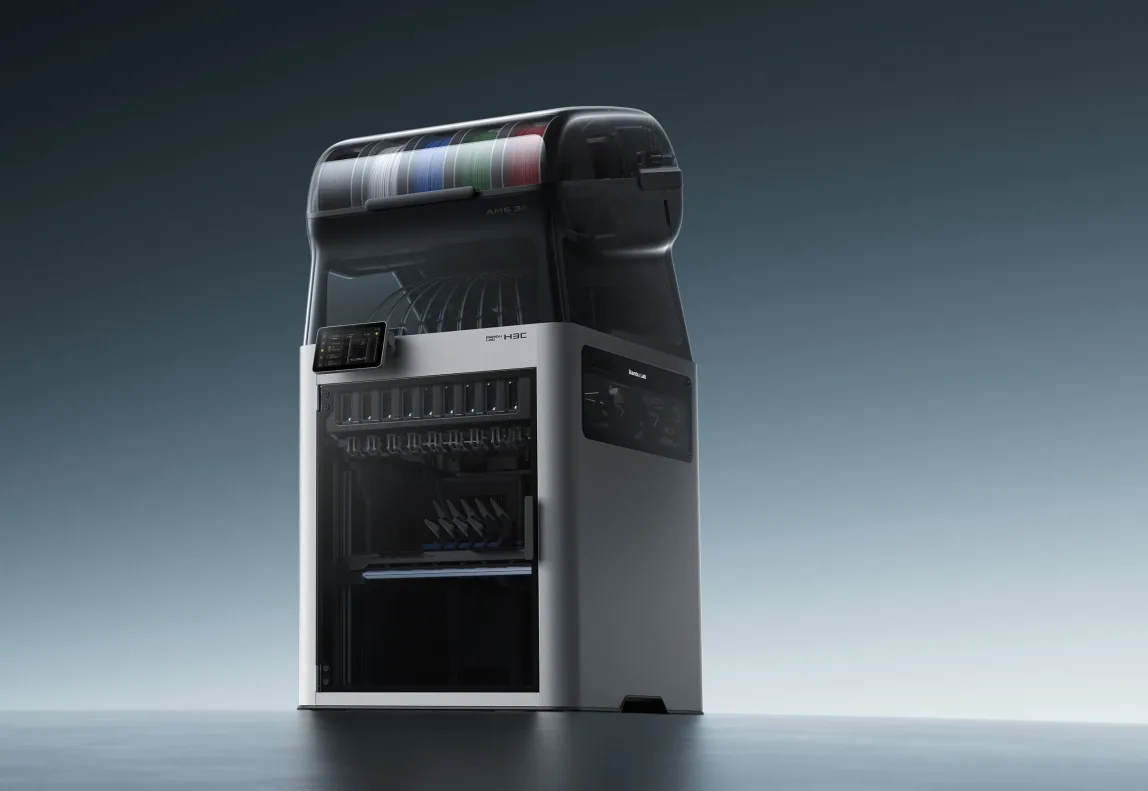
The Bambu Lab H3C is a nine-tool changer. It went on sale November 3, 2026, at $2,499 in the US, and that price includes the AMS 3H filament system. It fixes the biggest problem with the H2C’s hotend swapping, which is the single shared filament path. It does not fully remove purge, and its chamber is no hotter than the Creator 5 Pro’s. For functional multi-material parts, it wins on build volume and tool count, not on purge waste.
I haven’t printed on one. Everything below comes from Bambu’s launch material, the data sheets, and early reviews. Those reviews are only days old, so treat the reliability picture as unsettled.
What is the Bambu Lab H3C, and what does it cost?
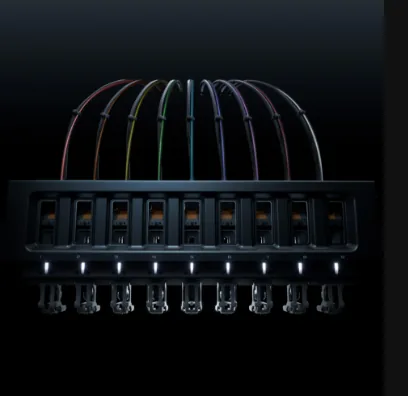 Image: Bambu Lab
Bambu calls the system Swaptek. Each tool has its own filament path and heating element, so the material stays loaded and pre-heated. The nine tools are held by a rack mounted on the front of the chamber. The rack is not a fixed shelf. It retracts and adjusts its vertical position during tool pickup, and Bambu says this improves alignment and moves the filament tubes away from the print area. Tom’s Hardware found it adds a layer of unneeded complexity, so it is one more mechanism to watch for wear.
Confirmed specs from launch coverage:
- The build volume is 330 × 320 × 325 mm, with a 350 °C maximum nozzle temperature, a 120 °C bed, and an actively heated chamber reaching 65 °C.
- It accepts 0.2, 0.4, 0.6, and 0.8 mm nozzles and 1.75 mm or 2.85 mm filament.
- Maximum speed is 1,400 mm/s and maximum hotend flow is 40 mm³/s.
- Every nozzle is hardened steel at HRC 55+.
- The chamber is actively heated and cooled, so it can run warm for engineering materials and stay cool for PLA.
- Bambu lists automated multi-process tool switching: besides printing, tools can cut, draw, and deboss in the same job.
- The printer measures 493 × 571 × 587 mm and weighs 36.28 kg including the AMS 3H.
There is one launch configuration. It has eight 0.4 mm PrintTools for 1.75 mm filament and a ninth 0.4 mm tool with a dedicated 2.85 mm path. So running nine colors of standard 1.75 mm filament needs one more 1.75 mm PrintTool. Bambu’s US store lists an additional regular PrintTool at $219, and it showed as sold out.
On availability, the US store page lists an estimated ship date around November 30, 2026. Bundles run $2,589 with a PLA and TPU starter pack, and $3,049 with the enclosed Bambu Station and E1 air purifier.
How does Swaptek differ from the H2C’s Vortek hotend swapping?
The H2C swaps only the hotend. Up to six interchangeable hotends sit in a rack beside the printhead. The printer picks one up and heats it in about 8 seconds with induction. That makes seven materials per job, but they share one filament path. All3DP notes that all but one of the H2C’s seven possible nozzles are fed through a single path connected to the AMS units.
The H3C swaps a whole tool, with its own tube and heater, and the filament never moves. CNCKitchen measured a typical change of six to seven seconds, against around 40 seconds on the H2C. Bambu’s own figures are 3.4 seconds for the swap and about 6 seconds for a full material switch. Those come from internal testing with PLA Basic and a filament-saving purge mode. One independent multicolor test averaged about 14 seconds once prime-tower work was included.
There is one more catch for anyone with an AMS shelf. Outside AMS units run through a single tool slot, so you lose the purge-free benefit.
Does the H3C really eliminate purge waste?
No, and Bambu doesn’t claim it does. The 38 mg per swap figure is from internal optimal-condition testing and varies with settings and filament. CNCKitchen measured about 50 mg on the prime tower per change. That works out to around 15 mm of filament extruded per change.
Prusa’s INDX is lower. Prusa quotes about 12 seconds and about 0.013 g per change, left on a small wiper inside the chamber. On Tom’s Hardware’s test model, the H3C printed in 15 hours 12 minutes with a 152.6 g prime tower. The INDX ran the same print in 8 colors in 15 hours 38 minutes and wasted only 24 g.
For functional parts, the per-change numbers matter less than the change count. A bracket with a TPU pad and a rigid body might need a few dozen swaps. At 50 mg per change, 100 swaps is about 5 g on the H3C. The same job on INDX is about 1.3 g. A figurine with thousands of changes is a different story. Tower size and layer-by-layer purge settings in the slicer will move your waste more than the hardware gap.
Bambu Lab H3C vs Creator 5 Pro vs Prusa INDX: the numbers
Price per tool below is the whole machine divided by its tool count. It is a rough yardstick, not an accessory price.
| Bambu H3C | Flashforge Creator 5 Pro | Prusa CORE One+ INDX (8-tool) | |
|---|---|---|---|
| Tools | 9 (8 × 1.75 mm, 1 × 2.85 mm) | 4 | 8 |
| Build volume (mm) | 330 × 320 × 325 | 256 × 256 × 256 | 248 × 205 × 270 |
| Chamber | Active, up to 65 °C | Active, up to 65 °C | Up to 55 °C |
| Max nozzle | 350 °C | 320 °C | Not confirmed in sources |
| Change time (vendor) | ~6 s | ~7 s | ~12 s |
| Purge per change (vendor) | ~38 mg | Marketed as zero purge | ~13 mg |
| US price | $2,499 | $849 sale ($949 list) | $2,249 assembled, $1,949 kit |
| Price per tool | ~$278 |
Sources for the table: the H3C figures are above. The Flashforge numbers come from its product page ($849 sale, $949 regular, 256³ mm, 320 °C, 32 mm³/s), with a 7-second FlashSwap. The Prusa numbers are $2,249 assembled and $1,949 as a kit with eight tools, a 248 × 205 × 270 mm volume, and 55 °C in the chamber.
By volume, the H3C is about 34 L. The Creator 5 Pro is about 17 L, and Prusa lists 13.7 liters for the INDX. The INDX also gives up some X and Y travel to the tool rack, which sits at the front. All four Creator 5 Pro toolheads reach the full 256 mm cube. One independent test measured a 60 °C firmware ceiling on the Creator, so don’t count on the full 65 °C.
The marginal tool price favors Prusa. Tom’s Hardware reports individual INDX tools at $45 on the Bondtech website. That is far below the H3C’s $219 listing. If you want to keep spare tools loaded with different nozzles, that gap adds up.
I covered the Flashforge in more detail in my Creator 5 Pro deal vs H2D, INDX, U1, P2S comparison and the Prusa side in why the INDX 8-tool changer might be my next printer.
Which toolchanger fits functional multi-material parts?
The H3C fits when your parts are big or need a lot of capability: housings with TPU gaskets, jigs with soft contact pads, or parts mixing a 0.8 mm structural nozzle with a 0.4 mm detail nozzle. Bambu’s slicer plans mixed-diameter toolpaths so each nozzle prints at its own suitable layer height. Soft TPU is a real draw: Bambu’s own TPU goes as soft as 75A through the 2.85 mm tool. The 350 °C hardened nozzles also leave room for abrasive and high-temperature filaments.
The Creator 5 Pro makes sense when four materials are enough. Two colors or materials plus support interfaces cover most functional work. It matches the H3C’s 65 °C chamber spec for ABS, ASA, and nylon. It costs a third as much, but it’s capped at 320 °C and 4 tools.
The Prusa INDX wins on waste, tool cost, and an offline workflow. It loses on build volume and chamber temperature. A 55 °C chamber is workable for ASA, PC, and nylon, as I covered in my CORE One+ heated chamber post, but it has less margin on large warp-prone parts.
Whatever you buy, material pairing matters more than the toolchanger. Dissimilar plastics bond poorly, and the interface between them is the weak plane. Put TPU-to-rigid joints in shear or compression, not peel. Dry the filament too: the H3C’s AMS 3H has two slots that dry at up to 85 °C, even mid-print, so the other seven rely on whatever you did before loading. My filament drying guide covers the pre-drying step.
Who should skip the H3C?
Skip it if you print one or two materials most of the time. Bambu’s H2D, H2S, and X2D lineup costs far less for that job. Skip it if floor space is tight: with the AMS 3H on top it stands 1,016 mm tall and weighs about 80 pounds. Also skip it if you need proven long-run reliability. One early report had a machine pass 414 hours without a technical failure while another stopped near 300 hours. That’s a thin sample, and these are launch-week units. I’d wait for a few months of field reports before putting one in a production role.